On a first trip to Korea, sooner or later there will be a menu you cannot read. This guide compares three translation apps that travellers often weigh against each other, Naver’s Papago, Google Translate and DeepL, for the jobs a traveller actually has: reading menus and signs, talking to someone face to face, and making sense of longer messages. All three are free to download, but they are built for different jobs. This is a research piece, written from the companies’ own help pages, announcements and app-store listings checked on 21 October 2026 (22 October in Korea). It is not a test of translation quality, so it does not rank the apps by accuracy. Features change often and many depend on the language pair, so check the ones you need in the app itself.

The three jobs you will actually translate on a Korea trip
Start with the situations rather than the apps. Translation on a short trip falls into three jobs. The first is reading: menus, shop signs, a notice on a door, the label on a box of cold medicine. The second is talking: explaining an allergy to a server, asking a pharmacist a question, sorting out a booking at a guesthouse. The third is longer text: a message from your host, rental terms or a long email. The three apps handle these jobs differently, and on a first trip the camera is likely to be the feature you reach for most often.
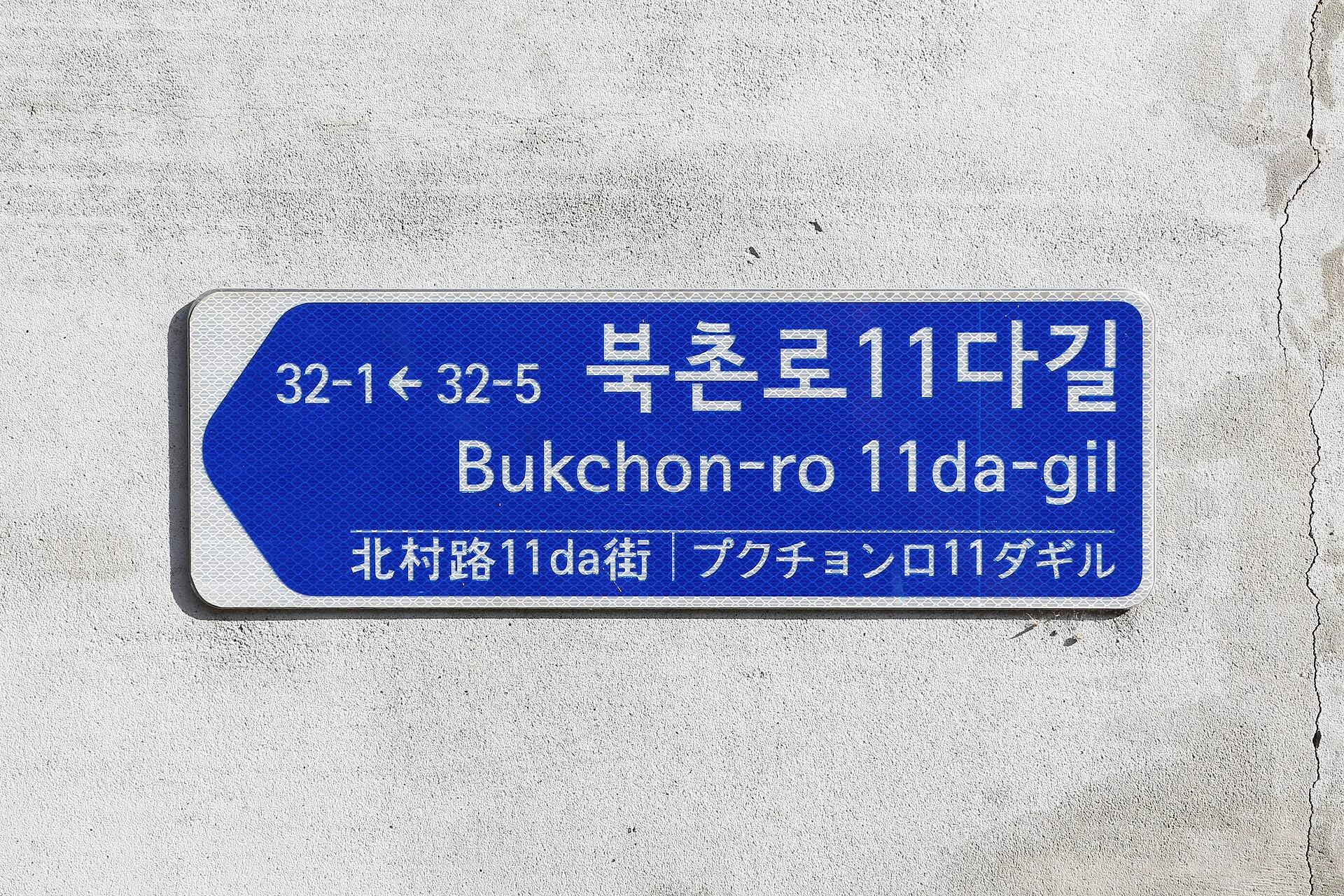
Korea’s official signage already helps. Road-name plates and station signs add romanized Korean and, in tourist areas, often Chinese and Japanese, like the Bukchon sign shown here. Menus and notices in small restaurants and markets are another matter: in our September 2022 photo of Gwangjang Market in Seoul, the boards over the food stalls are almost all in Hangul. That is where camera translation earns its place. Google says its camera overlays translations directly onto things like menus and signs, and Naver’s help centre names signboards, cosmetics and medicines as examples for Papago’s image translation.
Two limits apply to all three. Each company warns that some text is hard to read: Naver names handwriting, cursive and busy patterned backgrounds, Google small, unclear or stylised text, and DeepL handwriting. A hand-written market menu is exactly that kind of text. And the most useful features need a data connection, so decide before you fly whether you will rely on offline packs or on a SIM or eSIM.
Papago: built around Korean, with a polite-Korean switch
Papago is Naver’s translator. The app is published by NAVER Corp. and is free, and Naver’s 2024 announcement describes it as an AI translation service of its affiliate NAVER Cloud, running on its own neural machine translation. Naver’s Korean help centre lists 14 languages: Korean, English, Japanese, Chinese (Simplified and Traditional), Spanish, French, Vietnamese, Thai, Indonesian, Russian, German, Italian and Arabic, and the web version adds Hindi and Portuguese paired with English. That is a short list next to Google’s, but every language on it pairs with Korean, which is the point of the app.
For reading, the camera has several modes. You can photograph a sign or a box and rub the phrase you want with a finger, translate the whole image, or take a photo and have the translation laid over it, an instant mode that Naver says works among 13 of the languages (Arabic is not yet included). There is also a real-time mode that translates what the camera is looking at without taking a photo, and pictures from your gallery work too.
For talking, Papago has a 1:1 conversation mode: each person taps the microphone on their side of the screen and speaks their own language, and the translation is shown and read aloud. A feature worth knowing about is the honorific switch. Korean changes its verb endings to show politeness, and in January 2019 Naver added a switch that turns casual Korean output into polite Korean, starting with English-to-Korean translation. Naver’s own example turns 연락 줘서 고마워 into 연락 주셔서 감사합니다, both meaning “thanks for getting in touch”. The switch is still in the app, but Naver’s current help does not say which language pairs use it, so try it with your own language before you rely on it for a message to a guesthouse host.
Papago also works offline, within limits. After you download its offline language packs, text and voice translation work without a connection, but only between Korean, English, Japanese and Simplified Chinese, and only on phones with at least 4 GB of RAM; offline voice on Android also needs Android 14 or later. Conversation, image, website and document translation, handwriting and the honorific switch all need a connection, so reading a menu with the camera still means having data.
For longer text, the web version at papago.naver.com translates up to 3,000 characters at a time without logging in. Document translation needs a Naver login and accepts PDF, Word, PowerPoint, Excel and HWPX files of up to 20 MB and 20,000 characters, between Korean, English, Japanese and Chinese only, with 20 documents per account a month. Papago’s consent notice says that if you agree, translation requests may be stored and used to improve Naver’s technology and services, and you can change that choice in the settings at any time.
Google Translate: the most languages, a live camera and live conversation
Google Translate is a free app from Google LLC, and in April 2026 Google said it works for almost 250 languages. That breadth is the main reason to keep it: if your own language is not on Papago’s list, Google Translate is likely to be the app that pairs it with Korean. Google also says feature support varies by language, so check the camera, voice and offline features for your own language pair.
The camera works much like Papago’s real-time mode: point the phone at a menu and the translation appears over the original text. You can pause it, choose a photo from your gallery, or highlight just part of the text. Google’s help also warns that small, unclear or stylised text may be mistranslated, and suggests the flash in low light.
Offline use is Google’s other strength, with a catch. You download languages from the language picker; Google says that if there is no Download button next to a language, that language cannot be used offline, and recommends Wi-Fi for the download. To use the camera offline you need both the “from” and the “to” language. The Google help pages we checked do not give a per-language list of offline packs, so open the app before your trip and make sure Korean shows a Download button.
For conversation, the feature to look for is Live translate, a Gemini-powered speech-to-speech mode that launched on 26 August 2025 for users in the U.S., India and Mexico. Korean is on its list of supported languages, the microphone detects when the speaker switches language, and a face-to-face mode splits the screen so each person reads their own half. In June 2026 Google said its newest live translation model was rolling out in the app globally on Android and iOS. Even so, check that Live translate appears in your app before you depend on it. Offline live translation is limited to recent Pixel phones, and Korean is not among its language pairs.
Smaller features help on the road. On Android, Tap to Translate translates text you copy in any app, and Google says the text is sent to Google only after you tap the icon. On a computer, Google translates documents of up to 10 MB (PDFs up to 300 pages), though not on mobile. What the Google help pages we checked do not describe is any setting for polite or casual Korean, and that is where Papago is different.
DeepL: longer messages and documents, with free-tier limits
DeepL, a company based in Cologne, Germany, added Korean on 31 January 2023 and now lists more than 100 languages. Its app centres on text: typed text, dictation and read-aloud, file translation and transliteration, plus a camera mode. DeepL’s iOS page promotes the camera for signs, menus and printed text. DeepL also says feature support varies by language, and the help page that lists the mobile camera’s languages would not open when we checked, so we could not confirm camera translation for Korean.
The free version comes with limits. DeepL’s pricing page, shown to us in euros for Germany, lists 50,000 characters per user per month and one file translation a month of up to 5 MB on the free version, and its image-translation page puts free image translation at 1,500 characters a day. Paid plans raise the limits; on the pricing page the Individual plan was €7.49 a month, billed annually, and prices differ by country and by how you subscribe.
Two features a traveller might expect are missing from the free app. The store listings mention no offline translation (the iOS page offers offline access only to saved terms) and no face-to-face conversation mode; DeepL Voice for in-person conversations is a business product, priced by its sales team. The formal/informal tone setting comes with a paid plan, and we could not confirm that it works for Korean.
Privacy is the last difference. DeepL’s privacy policy says text and translations from the free version are processed for a limited period to train and improve its neural networks, while Pro subscribers’ texts are deleted after the translation and not used to improve quality. That matters more for a rental agreement or a message with personal details than for a menu.
Before you fly: set up two apps and know their limits
A good setup costs nothing. Install Papago and Google Translate before you leave, open each one on Wi-Fi and download the offline packs: Papago’s packs if your language is English, Japanese or Simplified Chinese, and Google’s Korean pack (plus your own language) once you have checked for the Download button. If you already use DeepL, keep it for longer messages.
Then match the app to the moment. For a menu or a sign, use the camera, and read the result with some suspicion when the board is hand-written. For a quick exchange at a counter, open a conversation mode and hand the phone over. When you write to a host or a shop, let Papago’s honorific switch make your Korean polite if it works for your language. For a long message, paste it into DeepL or Google Translate on a computer.
Finally, keep personal details out of free translators where you can. Leave out passport numbers, bank details and medical information where the message still makes sense without them. Papago’s consent notice says text may be used to improve its services if you agree, and DeepL’s privacy policy says text entered in its free version is used for a limited period to train its models.
Related on Rank Three: translation apps work best with a data connection, so see Internet for a Korea trip: physical SIM, eSIM or pocket Wi-Fi?; for finding somewhere to eat, Naver Map vs KakaoMap vs Google Maps for finding restaurants; and if you would like to pick up some Korean yourself, King Sejong Institute vs Talk To Me In Korean vs Duolingo: where to start learning Korean?.
Our three picks
- Papago: built around Korean, with a polite-Korean switchPapago
The first app to install for Korea. It is built around Korean, with camera modes for menus and signs (including a live overlay), a 1:1 conversation mode and an honorific switch for polite Korean, introduced for English-to-Korean. Offline packs cover text and voice for Korean, English, Japanese and Simplified Chinese only, and it supports 14 languages in all.
- Google Translate: the most languages, a live camera and live conversationGoogle Translate
The second app, and the first if your language is not on Papago’s list: almost 250 languages, an instant camera that works offline once both languages are downloaded (check that Korean shows a Download button), and Live translate for two-way conversation. Korean is on its list, but it launched in only three countries at first, so check your app.
- DeepL: longer messages and documents, with free-tier limitsDeepL
For longer messages and documents: Korean since January 2023, with file and camera translation in the app (camera support for Korean not confirmed). The free version allows 50,000 characters and one file a month, has no offline or conversation mode, and free-tier text may be used for training; the tone setting needs a paid plan, and Korean support for it is not confirmed.
Side by side
| What to check | Papago | Google Translate | DeepL |
|---|---|---|---|
| Made by, cost | Naver (app by NAVER Corp.), free; Papago Plus is a separate paid business service | Google LLC, free | DeepL SE, free with paid plans (Individual €7.49/month billed annually on the German price page) |
| Languages (checked 21 Oct 2026) | 14, all paired with Korean | Almost 250; features vary by language | 100+; Korean since January 2023 |
| Camera for menus and signs | Snap and rub, whole image, instant overlay (13 languages), real-time view | Instant overlay, gallery photos; works offline if both languages can be downloaded (check for the Download button) | Camera and photo translation (Korean support not confirmed); free image translation 1,500 characters a day |
| Face-to-face conversation | 1:1 conversation mode | Live translate with a split-screen face-to-face mode; Korean supported; launched in three countries first | No free conversation mode; DeepL Voice is paid (the in-person version is a business product) |
| Offline | Text and voice for Korean, English, Japanese, Simplified Chinese (4 GB RAM) | Languages that show a Download button; check before you fly | Not offered (saved terms only) |
| Polite Korean | Honorific switch (2019, English to Korean first) | No setting described in the help pages | Tone setting is paid; Korean not confirmed |
| Long text and documents | Web: 3,000 characters without login; documents with login, 20 MB / 20,000 characters, Korean, English, Japanese, Chinese only | Computer: documents up to 10 MB (PDF 300 pages) | Free: 50,000 characters and 1 file (5 MB) a month |
| Data on the free tier | With consent, may be stored and used to improve the service; change in settings | Tap to Translate sends text only after you tap; Google’s wider data use not reviewed here | Free text used for a limited time to train models; Pro text deleted |
| Good for | Korean-first trips: menus, signs, quick chats | Other languages, live conversation, an offline camera | Longer messages and files |
Where I would start
For a first trip to Korea I would install Papago first and Google Translate second. Papago’s camera, conversation mode and honorific switch are built around Korean, and Google covers the languages Papago does not, with an offline camera and live conversation where the feature has reached you. DeepL is worth keeping for longer messages, as long as you remember the free version’s limits and its privacy terms. Whichever you choose, set it up on Wi-Fi before you fly, and treat the translation of a hand-written menu as a good guess rather than the last word.

